
Google Maps lead lists
Google Maps leads.
Google Maps leads.
Pay per pack. No subscription.
See real sample leads when available and your estimated price before you pay a cent. Get a free estimate with no signup, then buy only the pack you need.
No signup to estimate
Real sample records
No monthly commitment
CSV or Excel export
See the data before you buy
These records are fully visible so you can check the quality. Create a fresh pack to collect and export a current list.
| Name | City | Phone | Category | Website | Rating | Data | |
|---|---|---|---|---|---|---|---|
| Taste America Restaurant Group | Chicago, IL | (312) 644-9100 | American Restaurant | http://catch35.com/ | - | ||
| Chicago Central University | Chicago, IL | (312) 818-2265 | University | https://www.chicagocentral.university/about-us/ | restaurantelapitrasica@hotmail.com | ||
| Taste Chicago | Chicago, IL | - | Restaurant | https://www.chicago.gov/city/en/depts/dca/supp_info/taste_of_chicago.html | dcase@cityofchicago.org | 1 |
Ready to buy this lead list?
Create the full data pack with the same keyword and location. You can review billing before the task runs.
How it works
From first search to export in 3 simple steps.
1
Search free
Enter a keyword and location to see estimated results and price before spending.
2
Review the list
Check real records, fields, contact signals, ratings, and coverage before buying.
3
Purchase & export
Create the data pack, review billing, then export the finished leads to CSV or Excel.
Inspect a real export before purchase
Download a sample Excel file to see the finished output: business names, addresses, phones, websites, emails, social links, ratings, reviews, and categories.
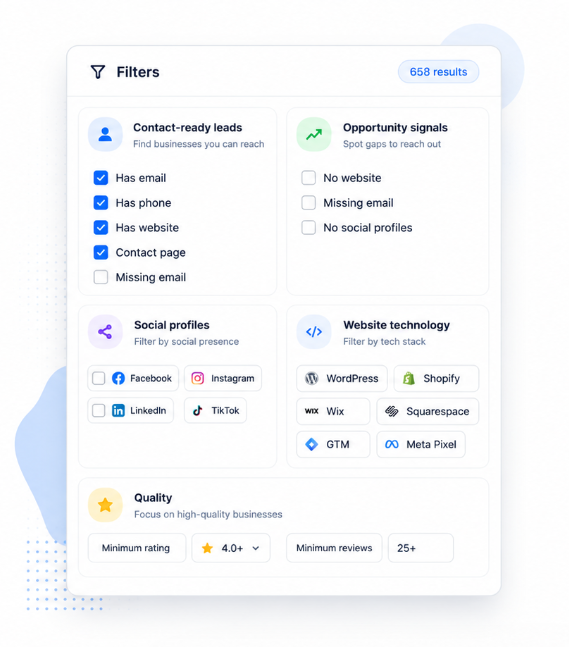
Smarter lead filtering
Find the exact businesses you want, not just more rows.
Filter Google Maps business data by contact details, website status, ratings, reviews, social profiles, and website technology before exporting to Excel or CSV.